Nonprofit organizations across New York rely on technology to manage donations, communicate with supporters, protect sensitive information, and deliver essential community services. However, many nonprofits still operate with outdated servers, limited IT resources, and systems that make collaboration difficult.
Cloud Migration offers nonprofits a modern way to improve technology performance while creating a more flexible and reliable IT environment. By moving applications, files, and digital resources to cloud-based platforms, organizations can access important tools from anywhere while reducing dependence on traditional infrastructure.
For nonprofit leaders, the goal is not simply adopting new technology. The goal is creating a secure, efficient, and affordable technology strategy that supports the organization’s mission.
Cloud Migration is the process of moving digital systems, applications, databases, and files from traditional on-premises environments to cloud-based platforms.
Instead of storing everything on physical servers located inside an office, organizations can use cloud infrastructure managed through secure online environments. This allows employees and authorized users to access information remotely while maintaining appropriate security controls.
A successful Cloud Migration strategy usually includes planning, data assessment, security reviews, system selection, testing, and ongoing management.
For nonprofits, this approach can be especially valuable because many organizations need enterprise-level technology capabilities while working with limited budgets and staff resources.
New York nonprofit organizations often face unique technology challenges. Teams may work across multiple locations, coordinate with volunteers, manage confidential information, and serve communities with limited resources.
Traditional IT systems can create problems such as:
Cloud Migration helps nonprofits create a technology foundation that supports growth and operational flexibility.
A well-planned cloud strategy allows nonprofit teams to focus more on their mission and less on managing complicated technology issues.
Protecting sensitive information is a priority for every nonprofit. Organizations may store donor information, employee records, financial documents, and confidential program data.
Cloud Migration can improve security by providing access to advanced security features, controlled user permissions, backup solutions, and monitoring tools.
However, cloud security depends on proper configuration and management. Nonprofits should work with experienced IT professionals to ensure systems are correctly protected.
Many nonprofit teams need flexible work options. Staff members may work from offices, community locations, or remote environments.
With Cloud Migration, authorized employees can securely access files, applications, and communication tools from different locations.
Benefits include:
This flexibility helps nonprofit organizations operate more efficiently.
Maintaining physical servers and outdated hardware can become expensive. Organizations must manage repairs, upgrades, storage limitations, and maintenance expenses.
A properly planned Cloud Migration approach can help nonprofits move toward more predictable technology costs.
Instead of investing heavily in physical infrastructure, organizations can select cloud services that match their operational requirements.
Nonprofits often experience changing needs. Programs may expand, fundraising campaigns may increase activity, or new employees and volunteers may join the organization.
Cloud solutions allow organizations to adjust technology resources as needs change.
This scalability makes Cloud Migration a practical choice for nonprofits that want technology capable of supporting future growth.
Unexpected events such as hardware failures, cyber incidents, or natural disasters can interrupt nonprofit operations.
A strong Cloud Migration plan can include reliable backup and recovery strategies that help organizations restore important data and maintain continuity.
Disaster recovery planning is especially important for organizations that depend on uninterrupted access to critical information.
Cloud platforms often provide access to advanced tools without requiring nonprofits to purchase and manage complex infrastructure.
Organizations can benefit from:
These resources allow nonprofits to use technology more strategically.
Many nonprofit organizations do not have dedicated internal IT departments. Managing servers, security updates, and technical issues can become overwhelming.
Professional IT support helps organizations plan and manage Cloud Migration projects while reducing technology-related stress.
Although cloud technology provides many advantages, poor planning can create unnecessary challenges.
Every nonprofit has different requirements. A solution that works for one organization may not be suitable for another.
Before beginning Cloud Migration, organizations should evaluate:
Moving systems to the cloud does not automatically guarantee protection.
Organizations must consider:
A rushed migration can lead to disruptions and confusion.
Successful Cloud Migration requires careful preparation, testing, and communication with employees.
Technology improvements only work when teams understand how to use new systems.
Training helps employees adopt cloud tools confidently and safely.
Iconyx Technology helps organizations improve their technology environment through IT services and communication solutions designed around business needs.
For nonprofit organizations in New York, professional technology guidance can simplify complex projects such as Cloud Migration, network improvements, cybersecurity planning, and communication upgrades.
A trusted IT partner can help nonprofits:
The right technology approach allows nonprofits to focus more resources on their communities and programs.
Modern nonprofits also depend on reliable communication. Phone systems, video meetings, and collaboration tools are essential for connecting with staff, donors, volunteers, and community partners.
Cloud-based communication solutions, including VoIP services, can work alongside Cloud Migration strategies to create a more flexible workplace.
Benefits may include:
Combining cloud infrastructure with modern communication tools creates a stronger technology environment.
A successful Cloud Migration project should follow a structured process.
Identify existing systems, applications, data, and challenges.
Determine what the organization wants to achieve, such as better security, lower costs, or improved collaboration.
Develop a timeline, identify responsibilities, and prepare employees for changes.
Use proper backup, security controls, and access management.
After migration, regularly review systems and make improvements.
Following these steps helps nonprofits achieve better results and avoid unnecessary disruptions.
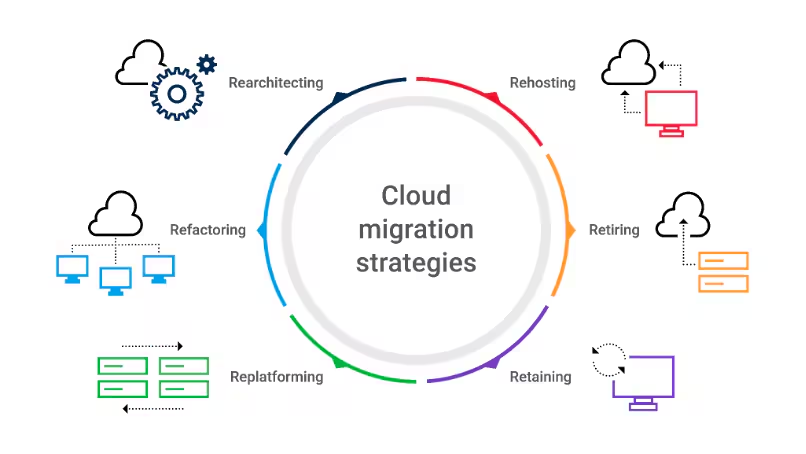
Cloud Migration is the process of moving nonprofit data, applications, and technology systems from traditional infrastructure to secure cloud-based platforms.
Nonprofits can use Cloud Migration to improve flexibility, collaboration, security, and technology management while supporting long-term organizational goals.
Cloud technology can provide strong security features, but organizations must properly configure systems, manage access, and follow security best practices.
The timeline depends on the organization’s size, number of systems, data volume, and migration strategy.
Yes. Small nonprofits can benefit from cloud solutions because they can access modern technology without managing extensive physical infrastructure.
Cloud solutions may help organizations create more predictable technology costs, although expenses depend on selected services and implementation requirements.
Iconyx Technology can help nonprofit organizations evaluate technology needs, plan IT improvements, and implement solutions that support their operational goals.
Technology plays an important role in helping nonprofit organizations achieve their missions. For New York nonprofits, Cloud Migration provides an opportunity to improve efficiency, strengthen security, support remote work, and create a more flexible technology environment.
However, successful migration requires careful planning, proper security practices, and expert guidance.
By working with an experienced IT services provider like Iconyx Technology, nonprofits can approach cloud adoption with greater confidence and build technology systems designed for long-term success.